AmpGUI DP Themes (now at AMPGUIMODS.NET)
Moderator: James Steele
Forum rules
This forum is for most discussion related to the use and optimization of Digital Performer [MacOS] and plug-ins as well as tips and techniques. It is NOT for troubleshooting technical issues, complaints, feature requests, or "Comparative DAW 101."
This forum is for most discussion related to the use and optimization of Digital Performer [MacOS] and plug-ins as well as tips and techniques. It is NOT for troubleshooting technical issues, complaints, feature requests, or "Comparative DAW 101."
-
KEVORKIAN
- Posts: 1042
- Joined: Thu Jul 06, 2006 10:21 pm
- Primary DAW OS: MacOS
- Location: I'm your Huckleberry
Re: AmpGUI7 (always updating first post)
+1
dp7.2 || os 10.6.7 || 2x2.8 (eight core) intel mac pro, 16gb ram || metric halo uln-8 || motu traveler || euphonix mc control || waves mercury || abbey road bundle || mh channelstrip || toontrack sd 2.0, ez drummer, drumtracker || addictive drums || drumcore 3 || ni komplete 5 || reason || bidule || altiverb 6 || omnisphere, stylus RMX || melodyne 3.2 || stillwell || soundtoys || nomad factory|| psp || mpressor || dsm ||
Re: AmpGUI7 (always updating first post)
+1+1+1
Such a relaxing blue... I want!
On a related note, I've found a bug with the AmpGUI's! In the MIDI editor, if I select a CC to edit it's value, the number gets partially chopped off. I only see '8' instead of '88'. If I click on the where I see '8' the full number is displayed/selected as usual. Happens in both the Gold and Dark GUI's.
Does that make sense?
Such a relaxing blue... I want!
On a related note, I've found a bug with the AmpGUI's! In the MIDI editor, if I select a CC to edit it's value, the number gets partially chopped off. I only see '8' instead of '88'. If I click on the where I see '8' the full number is displayed/selected as usual. Happens in both the Gold and Dark GUI's.
Does that make sense?
Re: AmpGUI7 (always updating first post)
Yes, this is a problem I was afraid would come up because the way the info bar is handled in DP. I may have to go to a completely translucent interior for when the end of the bar overlaps data or elements.npj wrote:+1+1+1
Such a relaxing blue... I want!
On a related note, I've found a bug with the AmpGUI's! In the MIDI editor, if I select a CC to edit it's value, the number gets partially chopped off. I only see '8' instead of '88'. If I click on the where I see '8' the full number is displayed/selected as usual. Happens in both the Gold and Dark GUI's.
Does that make sense?
Re: AmpGUI7 (always updating first post)
That's a bummer... For me, going translucent would be a worthwhile sacrifice. Does that mean the info bar would be the same colour as the MIDI editor's background?
Re: AmpGUI7 (always updating first post)
Gold Complete 1.4.1 posted...will do same fix to Dark soon...
Re: AmpGUI7 (always updating first post)
Delete
Last edited by amplidood on Thu Oct 29, 2009 12:04 am, edited 1 time in total.
-
KEVORKIAN
- Posts: 1042
- Joined: Thu Jul 06, 2006 10:21 pm
- Primary DAW OS: MacOS
- Location: I'm your Huckleberry
Re: AmpGUI7 (always updating first post)
I like it.
dp7.2 || os 10.6.7 || 2x2.8 (eight core) intel mac pro, 16gb ram || metric halo uln-8 || motu traveler || euphonix mc control || waves mercury || abbey road bundle || mh channelstrip || toontrack sd 2.0, ez drummer, drumtracker || addictive drums || drumcore 3 || ni komplete 5 || reason || bidule || altiverb 6 || omnisphere, stylus RMX || melodyne 3.2 || stillwell || soundtoys || nomad factory|| psp || mpressor || dsm ||
-
James Steele

- Site Administrator
- Posts: 21242
- Joined: Fri Oct 15, 2004 10:01 pm
- Primary DAW OS: MacOS
- Location: San Diego, CA - U.S.A.
- Contact:
Re: AmpGUI7 (always updating first post)
Wow! Dude... beautiful so far. I like it a lot. I hope you'll keep it a minor revamp, except I know I'd really like to see the same style faders you used in gold. I don't like the slotted 3d fader channels in the stock GUI. Also, consider this thread:amplidood wrote:Progress report...

http://www.motunation.com/forum/viewtop ... =1&t=38493
I don't think I'd use this mod overall, but notice the fader cap on the fader with a little green lite for unmuted and yellow for muted. I thought that was interesting... at least the concept of doing something diffent with the fader caps for muted/unmuted tracks. Perhaps muted could be a very light or ghosted outline... or maybe different colors. Or maybe nothng... just throwing it out there.
Either way, nice work on this so far. This is definitely the approach I wanted to take if I had the time to expend on my own mixing board mod.
JamesSteeleProject.com | Facebook | Instagram | Twitter
Mac Studio M1 Max, 64GB/2TB, MacOS 14.5 Public Beta, DP 11.31, MOTU 828es, MOTU 24Ai, MOTU MIDI Express XT, UAD-2 TB3 Satellite OCTO, Console 1 Mk2, Avid S3, NI Komplete Kontrol S88 Mk2, Red Type B, Millennia HV-3C, Warm Audio WA-2A, AudioScape 76F, Dean guitars, Marshall amps, etc., etc.!
Mac Studio M1 Max, 64GB/2TB, MacOS 14.5 Public Beta, DP 11.31, MOTU 828es, MOTU 24Ai, MOTU MIDI Express XT, UAD-2 TB3 Satellite OCTO, Console 1 Mk2, Avid S3, NI Komplete Kontrol S88 Mk2, Red Type B, Millennia HV-3C, Warm Audio WA-2A, AudioScape 76F, Dean guitars, Marshall amps, etc., etc.!
-
James Steele
- Site Administrator
- Posts: 21242
- Joined: Fri Oct 15, 2004 10:01 pm
- Primary DAW OS: MacOS
- Location: San Diego, CA - U.S.A.
- Contact:
Re: AmpGUI7 (always updating first post)
Oh... I'm just throwing this out there but I humbly suggest considering making the off status of the solo/mute/rec/input, etc... a totally neutral color, making it easier in a large mixing board to see which are lit, similar to my mixing board. Just a suggestion... I can always tweak stuff to individual taste. Either way, man... really like what you're doing with this one.
Here's my mixing board...
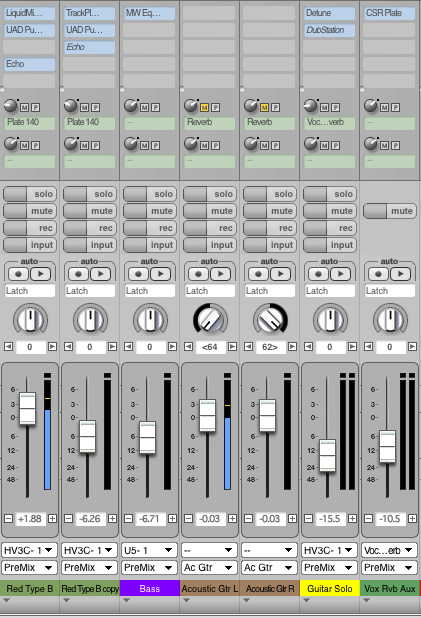
Here's my mixing board...
JamesSteeleProject.com | Facebook | Instagram | Twitter
Mac Studio M1 Max, 64GB/2TB, MacOS 14.5 Public Beta, DP 11.31, MOTU 828es, MOTU 24Ai, MOTU MIDI Express XT, UAD-2 TB3 Satellite OCTO, Console 1 Mk2, Avid S3, NI Komplete Kontrol S88 Mk2, Red Type B, Millennia HV-3C, Warm Audio WA-2A, AudioScape 76F, Dean guitars, Marshall amps, etc., etc.!
Mac Studio M1 Max, 64GB/2TB, MacOS 14.5 Public Beta, DP 11.31, MOTU 828es, MOTU 24Ai, MOTU MIDI Express XT, UAD-2 TB3 Satellite OCTO, Console 1 Mk2, Avid S3, NI Komplete Kontrol S88 Mk2, Red Type B, Millennia HV-3C, Warm Audio WA-2A, AudioScape 76F, Dean guitars, Marshall amps, etc., etc.!
-
groove
- Posts: 319
- Joined: Fri Oct 15, 2004 10:01 pm
- Primary DAW OS: MacOS
- Location: Montreal
- Contact:
Re: AmpGUI7 (always updating first post)
Amp,
this new mod you're working on is gorgeous. A clean mix of Motu's and your very own Dark mod for the pleasure of us all.
Please keep us post.
Thanks.
this new mod you're working on is gorgeous. A clean mix of Motu's and your very own Dark mod for the pleasure of us all.
Please keep us post.
Thanks.
---------
iMac Pro 3 GHz 10-Core Xeon E5, 64GB ram OS X 10.15.7, UA Apollo 8 Quad + Satellite Quad, UA 2192, Waves V12, LASS Full, VSL, Korg MS-20, Elektron A4, Moog SlimPhatty, NI Komplete13, ROLI, Soundtoys 5, Arturia V Collection, GForce Oddity, Serum.
iMac Pro 3 GHz 10-Core Xeon E5, 64GB ram OS X 10.15.7, UA Apollo 8 Quad + Satellite Quad, UA 2192, Waves V12, LASS Full, VSL, Korg MS-20, Elektron A4, Moog SlimPhatty, NI Komplete13, ROLI, Soundtoys 5, Arturia V Collection, GForce Oddity, Serum.
-
Dwetmaster

- Posts: 3491
- Joined: Tue Aug 15, 2006 9:59 am
- Primary DAW OS: MacOS
- Location: Montreal Canada
Re: AmpGUI7 (always updating first post)
Very Nice A'doodamplidood wrote:Progress report...
I've been wishing for new inserts for a while now. These will definitely be welcomed
MacPro 8Core 2.8GHZ 16GB RAM OSX10.8.3
MacBook Pro 17" Unibody 2011 OSX10.8.3
896mk3, BLA Modded 896HD, BLA Microclock, MTP-AV, Yamaha KX-8, CME VX-7 Mackie Ctrl, megadrum, Presonus C-S,
DP8.04, Bidule, M5 3, Ethno 2, BPM 1.5 Kontakt4, BFD2, SD2, Omnisphere, Wave Arts P-S5, Altiverb7, PSP VW & OldTimer, VB3, Ivory 2 Grand, True Pianos, Ozone 5, Reason 4, AmpliTube3, Bla bla bla...
A few El & Ac basses & Guitars, Hammond A-100.
MacBook Pro 17" Unibody 2011 OSX10.8.3
896mk3, BLA Modded 896HD, BLA Microclock, MTP-AV, Yamaha KX-8, CME VX-7 Mackie Ctrl, megadrum, Presonus C-S,
DP8.04, Bidule, M5 3, Ethno 2, BPM 1.5 Kontakt4, BFD2, SD2, Omnisphere, Wave Arts P-S5, Altiverb7, PSP VW & OldTimer, VB3, Ivory 2 Grand, True Pianos, Ozone 5, Reason 4, AmpliTube3, Bla bla bla...
A few El & Ac basses & Guitars, Hammond A-100.
Re: AmpGUI7 (always updating first post)
Hey man, it's a good idea. Here's the *only* issue I've always had with the solo setup in DP. In solo mode, attention is drawn to tracks that *are not* solo'd with all the yellows. This has always been distracting to me. If the yellow applied to the tracks that are actually being solo'd, I'd go ahead with an idea like this.James Steele wrote:I don't think I'd use this mod overall, but notice the fader cap on the fader with a little green lite for unmuted and yellow for muted. I thought that was interesting... at least the concept of doing something diffent with the fader caps for muted/unmuted tracks. Perhaps muted could be a very light or ghosted outline... or maybe different colors. Or maybe nothng... just throwing it out there.
-
James Steele
- Site Administrator
- Posts: 21242
- Joined: Fri Oct 15, 2004 10:01 pm
- Primary DAW OS: MacOS
- Location: San Diego, CA - U.S.A.
- Contact:
Re: AmpGUI7 (always updating first post)
Right. As i recall there's a fader graphic for muted channels and one for unmuted channels. You could probably have muted channels with a plain fader and active with an illuminated greed LED. Or just leave it alone. Just thinking out loud. I remember once suggesting something as radical to MOTU has having faders completely disappear when muted and reappear when not muted, although some people want visual indication of fader level when muted. Like I said, some sort of "ghost" fader that's translucent on muted channels might be cool.amplidood wrote:Hey man, it's a good idea. Here's the *only* issue I've always had with the solo setup in DP. In solo mode, attention is drawn to tracks that *are not* solo'd with all the yellows. This has always been distracting to me. If the yellow applied to the tracks that are actually being solo'd, I'd go ahead with an idea like this.James Steele wrote:I don't think I'd use this mod overall, but notice the fader cap on the fader with a little green lite for unmuted and yellow for muted. I thought that was interesting... at least the concept of doing something diffent with the fader caps for muted/unmuted tracks. Perhaps muted could be a very light or ghosted outline... or maybe different colors. Or maybe nothng... just throwing it out there.
JamesSteeleProject.com | Facebook | Instagram | Twitter
Mac Studio M1 Max, 64GB/2TB, MacOS 14.5 Public Beta, DP 11.31, MOTU 828es, MOTU 24Ai, MOTU MIDI Express XT, UAD-2 TB3 Satellite OCTO, Console 1 Mk2, Avid S3, NI Komplete Kontrol S88 Mk2, Red Type B, Millennia HV-3C, Warm Audio WA-2A, AudioScape 76F, Dean guitars, Marshall amps, etc., etc.!
Mac Studio M1 Max, 64GB/2TB, MacOS 14.5 Public Beta, DP 11.31, MOTU 828es, MOTU 24Ai, MOTU MIDI Express XT, UAD-2 TB3 Satellite OCTO, Console 1 Mk2, Avid S3, NI Komplete Kontrol S88 Mk2, Red Type B, Millennia HV-3C, Warm Audio WA-2A, AudioScape 76F, Dean guitars, Marshall amps, etc., etc.!
Re: AmpGUI7 (always updating first post)
OOoooooooh... duh. You are right. I'm thinking of what's wrong with the way they've set it up instead of using it to our advantage. See, I'm still learning.James Steele wrote:Right. As i recall there's a fader graphic for muted channels and one for unmuted channels. You could probably have muted channels with a plain fader and active with an illuminated greed LED. Or just leave it alone. Just thinking out loud. I remember once suggesting something as radical to MOTU has having faders completely disappear when muted and reappear when not muted, although some people want visual indication of fader level when muted. Like I said, some sort of "ghost" fader that's translucent on muted channels might be cool.

Re: AmpGUI7 (always updating first post)
Delete
Last edited by amplidood on Tue Oct 27, 2009 6:08 pm, edited 2 times in total.